Showing posts with label Apple. Show all posts

Friday, May 4, 2012

Please, Apple, Make the iPad Keyboard Work Like This

Typing on the iPad can be a pain when you're trying to get things written out in a flash. A guy named Daniel Hooper came up with an alternative way to make the typing process faster on the iPad. Help him out by following the simple steps given below and send his idea to Apple. The likelihood of you being impressed after watching this video is high.


Follow the directions below to let Apple know you want this feature. You can also share this with your friends so more people are involved! Follow @danielchooper on Twitter to stay up to date on this and other cool projects.

1. Go to bugreport.apple.com, sign in and click "New Problem"
2. Set the Title to "Editing Text on iPad (duplicate of rdar://11365152)"
3. Set the Product to "iPad", Version Number to "N/A", Classification to "Feature (New)" and Is It Reproducible to "Not Applicable"
4. Copy the letter below and paste it in the Problem Details section then click submit

I just saw Daniel Hooper's iPad keyboard demo and I want that for my iPad! (Check out the video here: http://www.youtube.com/watch?v=RGQTaHGQ04Q) Apple says the iPad is the future of the Post-PC world; if it's going to be my primary keyboard, I want a better way to edit text! 

Tapping directly on text to move the cursor works well for small portions of text, but we don't just write short portions of text anymore! When performing lots of edits in larger documents the direct interaction metaphor falls apart for cursor control. Even short portions of text can be painful to edit when you need to move the cursor to a precise location. Would you ever want to write a document on your computer without using the arrow keys? This is the reality iPad users face because they do not have the equivalent of arrow keys. There is a better way.

Take advantage of gestures by making a drag over the keyboard UI move the cursor. Move the cursor in word increments when dragging with two fingers. And finally, let the user select text while dragging when they hold down shift.


source


Visit our online store today!

Tuesday, April 24, 2012

Next iPhone Could Be The Thinnest Yet


Even thinner? Well wouldn't that be a delight for our pockets (or purses for the ladies). PCMag give us the insider on the recent news:

The next version of Apple's iPhone could likely be the thinnest one yet, thanks to the rumored switch to cutting edge in-cell touch panels, an analyst is predicting. 
Rumors surfaced late last week that the next iteration of the Apple smartphone will use new in-cell touch panels, reducing the weight and overall thickness of the device. Now, KGI Securities analyst Ming-Chi Kuo has issued a report agreeing with that rumor, and noting that that the switch to in-cell touch panel technology could shave .44 milimeters off the thickness of the next iPhone, according to AppleInsider. 
The new design would embed the phone's touch sensor within the display, thus eliminating the separate touch sensor layer, as well as one layer of adhesive used on the current model. Moreover, a thinner battery and Apple's rumored switch to a metal back instead of glass could further reduce the iPhones thickness by .96 mm, Kuo predicted.

Friday, April 20, 2012

Check It Out: Apple MacBook Pro A1286

If you're looking for a laptop with a fast performance and killer looks, the Apple MacBook Pro A1286 is a great choice for you!


imagebam.com imagebam.com imagebam.com

Apple MacBook Pro A1286 Review
The Pros: Good-looking design; Fast performance; Burn DVDs with nearly 9GB of space 


The Cons: Expensive; No HDMI port; No Blu-ray 


The Bottom Line: The Apple MacBook Pro is easily an ideal laptop for most people. Send e-mails, write reports, create presentations, edit home movies, upload photos to Facebook, and all the other tasks you can imagine. Plus, the long battery life gives you a chance to chat with family through FaceTime video calls or watch those long movies on iTunes. Perfect!

The aluminum unibody construction gives this laptop an extremely sleek design. The entire encolsure is thinner and lighter than other notebooks. It feels strong and durable - perfect for life inside (and outside) your backpack or briefcase. Two words to describe this beauty: polished and refined.

The interior comes with a large glass multitouch pad in addition to a large keyboard that allows for easy typing. The large trackpad uses multitouch gestures for much of its functionality. One of my favorite gestures has to be the sweeping movement you can do with four fingers; up hides all your active windows, left or right brings up the application switcher. There's also one called "inertial scrolling" which you can do by flicking two fingers up or down. This will make the page continue to move slightly up or down, depending on the direction you're going, even after you've lifted your fingers.

The MacBook Pro includes all the necessary connections and ports you could possibly need (and probably didn't even know you wanted.) When you're out and about, the latest 802.11 N wireless technology in MacBook Pro makes it easy to get connected just about anywhere you go. Now you can surf the web, send e-mail and print documents no matter where you are. Stay connected whether you're traveling from room to room or cubicle to cubicle. Another bonus of having wireless is the ability to download apps from the Mac App Store anytime you want. Can't wait to buy that song you just heard on the radio? With wireless, you can buy it right away. Perfect! Other ports include two USB 2.0 ports, an SDXC card slot, FireWire 800 port, and Audio in/out.

The MacBook Pro delivers amazing battery life. An energy-efficient processor architecture with an integrated video encoder, along with automatic graphics, all help improve battery life. You can expect to surf the web for up to 7 hours on a single day.

Overall, the MacBook Pro is the talk of the town with its beautiful design and fast performance. I use a MacBook Pro and home and I've never been disappointed with its performance. Once you go MacBook Pro, you don't go back.

TechTurn Editor's Rating

Reviewed by Chelsea Rivet

To shop for other laptops on our online store, click here.

Friday, April 13, 2012

Apple Wants To Change Their Current Earbuds' Shape


Apple has made it clear to the public that new and improved earbuds is an important chore on their To-Do list. Apple says the reason their current earbuds are 'no good' as of now is because of the multi-component design. How are they planning on fixing this problem? Make them unibody-ish.

The Apple Insider stated:

"The filing notes that holes are needed in earbuds to allow sound to travel, but the creation of those holes can result in remnants in or around them that degrade both the appearance of the device and the acoustic properties of the headphones. 
The solution presented in that application is a tool for "deburring" a curved plastic object. The tool could be coated in an abrasive material and would conform to the shape of the curved object, then polish it by vibrating while in contact with the plastic surface."
Apple states changing the design will improve the earbuds' acoustic properties. Does this mean the listening experience will be any better? We sure hope so.

via | via

Monday, March 26, 2012

Can A ZipLock Bag Protect An iPad From Water?

Interesting idea...I'm sure this would make bath time much more fun! Although, I wouldn't recommend trying this unless you have excess amounts of iPads at home or you don't mind possibly ruining a perfectly good device. This one seems to keep working after the man holds it under the water for a while, but I'm gonna take a big guess and say it probably started acting funny short after the iPad wash.

Prepare yourself for the video, since most likely you won't know what they're saying. Unless, of course, you speak japanese. If you do, props!

Tuesday, March 20, 2012

3 Million New iPads Sold in 3 Days


Apple announced Monday it had sold over 3 million New iPads since the new March 16th launch. This is the most successful launch yet, with CEO Tim Cook calling it a "record" weekend. Congrats, Apple! Congrats to all the lucky new users as well!

Here is a video discussing what the New iPad brings to the table:

Monday, March 19, 2012

Browser Round-Up: Which Is The Best One For You?

A large number of people tend to use the browser that just comes with their computer: Internet Explorer on Windows, Safari on the Mac, and Firefox on Linux. However, it's good to realize that laptop and desktop users still have a choice when it comes to what they'll be using to surf the web.

On the the most-widely used operating system, Microsoft Windows, you have five different options to choose from - Internet Explorer, Safari, Google Chrome, Firefox, or the Opera browser. Any system without Windows can't use Internet Explorer. 

You're thinking - how do I choose? Here are descriptions explaining the perks of each browser. Click on the browser title to view the main website and start your download. 

Internet Explorer - Compatible with PC & Mac (5.2.3 version)
The browser we've all surely heard of, Internet Explorer, is continually growing. The new Internet Explorer 9 is full of features like One Box, Pinned Sites, and Tap Enhancements. With One Box, you can start typing a web address and AutoComplete anticipates what you're looking for to help you get to your websites quickly. You can type in familiar terms like "news" or "music" and the sites will pop up right away. With Pinned Sites, you can get to your favorite sites directly from the Windows 7 taskbar—without having to openInternet Explorer first. Enhanced tabs allow you to "tear-off tabs" and interact with multiple sites in a fast and easy way.


Safari  - Compatible with Mac & PC
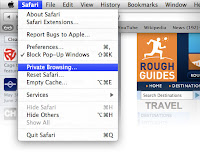
Safari works on your iPad, iPhone, iPod touch, Mac, and PC. Do you make a lot of spelling errors? Safari automatically corrects your spelling and grammar. (Life saver!) Safari is always fast. It uses an HTML5 audio and video tags, which reduces development time and gives you a faster response when trying to zoom through different pages. The window easily fits the screen. You can zoom in by just double-taping, or by pinching and extending your fingers. The browser even has a "Privacy Browsing" that allows you to see what websites are storing data that could be used to track you online. 


Google Chrome - Compatible with Mac, PC, and Linux
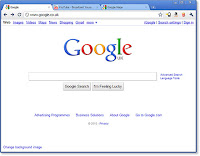
Chrome is designed to be fast in every way. It's quick to start up from  your desktop, loads web pages in a snap, and runs complex web applications lightning fast. The browser window is neat because you can search and navigate from the same box in addition to arranging your open tabs however you wish. Google Chrome also allows you to design your browser window in whatever way you'd like. You can choose a plain color scheme (black, gold, silver) or even pick a template, such as a background of flowers or a famous celebrity. (Don't worry there's "manly" backgrounds as well.) 


Firefox - Compatible with Mac and PC
Firefox has an easy-to-use search bar in the upper-right hand corner. Searching for things have never been so easy. By pressing, "CTRL-F", you'll notice a little bar appear at the bottom of the browser. It will stay at the bottom instead of getting in your way like some other pop-up dialog boxes will do. Firefox attached their URL bar to Google's "I'm Feeling Lucky" search option. Anything you type into the URL bar without an actual URL, will be put into Google's search engine and brought up once you hit enter. What a neat little feature!


Opera Browser - Compatible with Mac, PC, and Linux
You're definitely not limited on where you can use the Opera Browser; available on Windows, Macs, phones, and tablets. Cool Opera features include tab stacking, which allows you to drag one tab over another to create groups of tabs, and a Password manager that saves your password after the first time you log in to a website. The next time you go to that website, just press "CTRL + Enter" and you'll be logged in. 

Thursday, March 15, 2012

What Happened To Funny iPod Commercials?

Commercials in general have become duller and make the experience of breaks in between tv shows seem even longer. What ever happened to funny commercials like this funny iPod commercial with Will Ferrell? Granted, anything with Will Ferrell tends to be hilarious.

"I'm usually shirtless. Just for a fact. The money just starts flowing in."

Monday, March 12, 2012

iPad Shipping Time Now 2 to 3 Weeks


(GTK: Good to know)
The latest generation of Apple’s iPad is slated to hit U.S. stores on March 16, but that date is no longer mentioned on Apple’s site — at least for online pre-orders.
Soon after the device’s launch, the date shifted from March 16 to March 19. Weirdly enough, now even that date is gone from Apple’s site.
Regardless of which iPad model you choose, the estimated shipping time is now “2-3 weeks.”


Updated with Apple YouTube video describing the new iPad:

via | via

Friday, March 9, 2012

The 5 Free Must-Have iPhone Apps

With all the new apps available on the iPhone app store, we all could use a little guidance in which ones are actually beneficial. Here is a list of the 5 Free iPhone apps that we would recommend you download, install, and actually use.

1) Facebook - Free
No matter whether we like to admit it or not, Facebook keeps us connected to the world and updated on what's going on in our "Friends" lives, even if it makes us feel like a bit of a stalker. There are 800 million accounts worldwide. Whether you check it fifteen times a day or are just an occasional user, it's nice to stay on top of what's new in people's lives and do fun things like post pictures, tag pictures, and check-in at new destinations.

2) SHAZAM - Free (For a certain amount of song catches)
Shazam is one of my favorite apps ever invented. How many times have you been in the car, at a restaurant or basically anywhere, and heard a song and thought, "I love this song! What is it called?" Well months of torturing yourself in trying to think of one line from the lyrics to type into Google is no longer needed, my friend! All you need to do is open the app, press the Shazam button on the screen and hold your phone up to the song for the allotted amount of time (phone will vibrate when tagging is complete.) As long as there isn't any major background noise or people talking, I'd say this app is 99% effective. It even allows you to click on the song (located in My Tags) and look up the lyrics, find YouTube videos, and buy it immediately on iTunes. The free version only allows you to tag so many songs per month, which is perfect for people who won't use it that much. I bought the app for a year and it cost me $3.99. There is also a Lifetime package for $5.99. Totally worth it!


3) WebMD - Free
The moment you get sick, you'll be glad to have this app. With easy search options like symptom checker, conditions and first aid information, you might not even have to make a visit to your doctor. WebMD comes with simple instructions for all types of emergencies. It's a great medical relief when you're on the go, especially for parents. Warning: Don't get too search happy and freak yourself out.

4) Yelp - Free
Yelp is a great tool by pinpointing business by locations, letting you know if they're open at the moment of searching them, and shows you user-written reviews to help you decide if its the right place for you to go. If you're ever in an unfamiliar territory, Yelp will be your personal tour guide.

5) Find My iPhone - Free
Part and parcel of iOS5 and Apple's iCloud, Find My iPhone is a great app that needs to be installed and properly activated on your Apple device. If your cell phone is ever stolen or lost (it happens to the best of us), Find My iPhone will locate it physically, on a map, to show you exactly where it is. If you misplace your phone and think it might be stolen, you can go to the iCloud website from any computer and send a message that will flash on the phone screen. Another neat thing- if you think you misplaced it somewhere nearby, you can log in to the iCloud website and make your phone play a loud tone, even if it's set to silent. This is one of the best free features from iOS5 you can have. 

Thursday, March 1, 2012

New Rumors In Regards To Apple's Popular iPad

There are two different stories making it's way around in terms of the iPad. At the iPad-centric event coming up on March 7th, Apple is supposed to introduce they're looking to make a 7.85-inch iPad to compete with Amazon's Kindle Fire and the increasingly popular line of 7-inch tablets. In addition, Apple stated they're looking to introduce a cheaper 8GB version of the iPad 2. Could both of these stories be true? Yes. Is one of them most likely a myth? Yes.

PCWorld gives us the low down about what the likelihood is of these rumors being true:

DigiTimes reports that makers in Apple's supply chain have started delivering samples of 7.85-inch iPads for verification, with volume production likely to begin in the third quarter of 2012 at the earliest. This is apparently to counter the increasing popularity of the Amazon Kindle Fire, but there are several arguments against this idea. 
Apple doesn’t need a Kindle Fire competitor. Apple sold 43.1 million iPads in 2011, according to the company’s financial numbers. Amazon holds the number two tablet spot with 3.9 million Fire sales last year, which is not too bad, considering the likes of Samsung are openly admitting they are not faring well in the market. 
The only problem with that is that Amazon is actually selling the $200 7-inch Fire at a loss, about $10 per unit, hoping to recover money through content sales on the tablet. Apple on the other had, is making hundreds of dollars from each iPad sold, so it’s unlikely Apple will try to sell a smaller iPad in a similar fashion, or at a small profit margin. That’s besides Steve Jobs’ very public outing of his dislike for 7-inch tablets. 
What Apple is likely to do in order to sell a cheaper iPad is perhaps look at its iPhone lineup. Speculation of a small-screen budget iPhone is always a hot topic before each iPhone launch, but instead of making a smaller, cheaper device, Apple always opted to reduce the storage on the previous model and sell it a discount: The iPhone 4 is now $99, replaced by the iPhone 4S at the $199 price point, and the 3GS is free with a two-year contract. 
This is where DigiTimes’ second report rings true: an 8GB iPad 2 to go along with the iPad 3. This would allow Apple to sell a cheaper tablet alongside the brand new iPad 3. Now, you could argue that 8GB on an iPad is not a lot of space; you could quickly find you are out of space, as many apps and games for the tablet are quite sizeable. If the 8GB iPad 2 becomes reality, it’s likely that it won’t have a 4G version either, leaving this for its newer sibling.